
ed2k / Magnet Detection
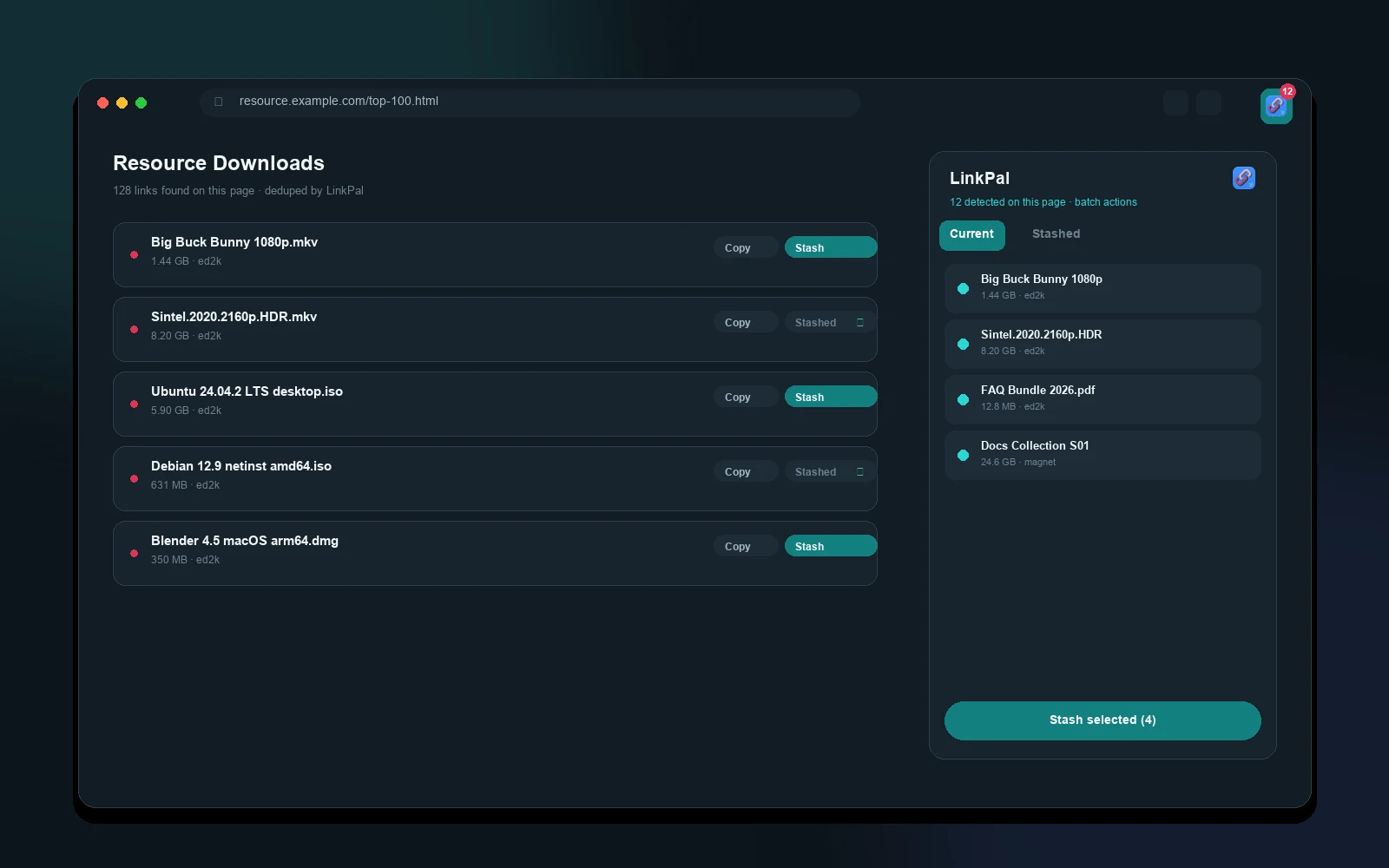
The Safari extension scans the current page (including dynamically loaded content), recognizes ed2k and magnet links, dedupes and validates them — only usable resources remain, and different spellings merge into one entry.
LinkPal is the smart link manager built for Apple devices: automatically detect ed2k & magnet links in Safari, turn any page into a QR code with QRify, save web page images in one tap with PicPal, and keep everything organized in an on-device data center. Fully offline — your links stay yours.
Extraction, detection, stashing, grouping, sharing, backup — every step around a link, handled quietly on your device.
The Safari extension scans the current page (including dynamically loaded content), recognizes ed2k and magnet links, dedupes and validates them — only usable resources remain, and different spellings merge into one entry.
Turn the current page into a QR code right in Safari, or generate one from a URL or text you enter. Customizable foreground, background, size, and error correction — fully offline.
PicPal recognizes images on a web page inside Safari — img, picture, CSS backgrounds, SVG, and data URIs — filters them by size or dimensions, and saves them to the Downloads folder or your photo library in one tap. Fully offline, no network. Free users can save 3 times; Pro or any one-time add-on unlocks unlimited.
Every stashed link lands in one place: sort by time, name, or size; source / date / size filter chips stay pinned above the list; groups without matches hide automatically while searching.
Create, rename, and reorder groups freely. Automation rules file newly stashed links into designated groups by domain or link text — reorder them, pause them, or apply to existing links in one tap.
Encrypt links, groups, and favorites into a backup file with your own password and export it anytime. Restore after a reinstall or on a new device — decryption happens entirely on device.
Share selected links or an entire group via AirDrop; recipients open the file to preview and import, with duplicates and invalid links skipped automatically.
A home screen widget shows your stash count and latest link; the "Stash link to LinkPal" App Shortcut works with a single sentence to Siri.
Everything stays local — no account, no uploads. Face ID / Touch ID lock, privacy shield on backgrounding, and multiple built-in anti-tamper protections.
Open any page with ed2k / magnet links — LinkPal detects them automatically, with copy and stash buttons right beside each link and a toolbar badge showing the count.
One tap stashes the link. Or import from the clipboard — the same extraction, validation, and dedupe logic as the extension, so links from any source land cleanly.
Group, filter, search, and batch-act in the data center. Set automation rules so new links file themselves, and export an encrypted backup — your data stays yours.
Turn the current page into a QR code right in Safari — scan it with your phone and you're there. Customize foreground color, background color, size, and error correction. No network, no uploads, no tracking.

Match on domain, text, or page name — new links land in the right group automatically, in rule order. Part of the Data Sovereignty Pack; rules stay on device and work fully offline.
Match by source domain (including subdomains), text in the link or source URL, or the saved page title — case-insensitive, with a per-rule on/off switch.
Rules are evaluated top to bottom and the first hit picks the target group. Only ungrouped links are touched; drag to reorder priority.
Applied automatically on one-tap stash and on AirDrop / file share / Shortcuts import — or tap "Apply to ungrouped now" whenever you like.
Core features are permanently free. Pro unlocks unlimited stashing and privacy protections as a subscription or a one-time lifetime purchase. Purchases go through Apple's In-App Purchase and can be canceled anytime.
Start anytime, no account
7-day free trial, cancel anytime
About $0.83 per month
Buy once, yours forever — including every future feature
Prices are synced from the App Store and shown in USD. The QR code extension ($0.99), Efficiency Pack ($1.99), and Data Sovereignty Pack ($3.99) can be bought separately; one-time purchases support Family Sharing. A lifetime purchase locks in the entire Pro suite plus every future feature. Tips are voluntary and unlock nothing.
Still stuck? Visit the support center or email f544hmrsr@mozmail.com.
LinkPal runs on iPhone, iPad, and Mac. It requires iOS / iPadOS 17.5 or later and macOS 14.6 or later. The Safari extensions are installed together with the App and enabled under Settings → Safari → Extensions.
No. Extraction, stashing, management, and QR code generation all happen on device. There is no account system and no server-side storage of your links. The only outbound network request is a read-only CloudKit public-database query for campaign dates, which carries none of your data — see the privacy policy.
On iOS / iPadOS, open Settings → Safari → Extensions and enable LinkPal, QRify, and PicPal. On macOS, enable them in Safari → Settings → Extensions. QR code generation also needs the plugin switched on in the App's Settings → QR Code section.
The free version stashes up to 10 links and 5 custom groups with full extraction and management. Pro unlocks unlimited stashing, unlimited groups, App Lock and Privacy Shield: $0.99/month or $9.99/year with a 7-day free trial, or a one-time $5.99 lifetime purchase that includes every future feature. The QR code extension ($0.99), Efficiency Pack ($1.99), and Data Sovereignty Pack ($3.99) can be bought separately; one-time purchases support Family Sharing.
No. The backup password is verified on device only and no copy is stored on any server, so a forgotten password cannot be recovered. Keep it safe, and store backup files in your own iCloud Drive or another location you control.
Export an encrypted backup in the App and restore it on the new device with the same password — decryption happens entirely on device. You can also AirDrop selected links or an entire group; the recipient opens the file to preview and import.
LinkPal supports 8 languages: Simplified Chinese, English, Japanese, Korean, Russian, Thai, Traditional Chinese (Taiwan) and Traditional Chinese (Hong Kong), with the Safari extensions following along.